Choose a scene
What each club scene is for. Each showcase uses one.
Team scenes
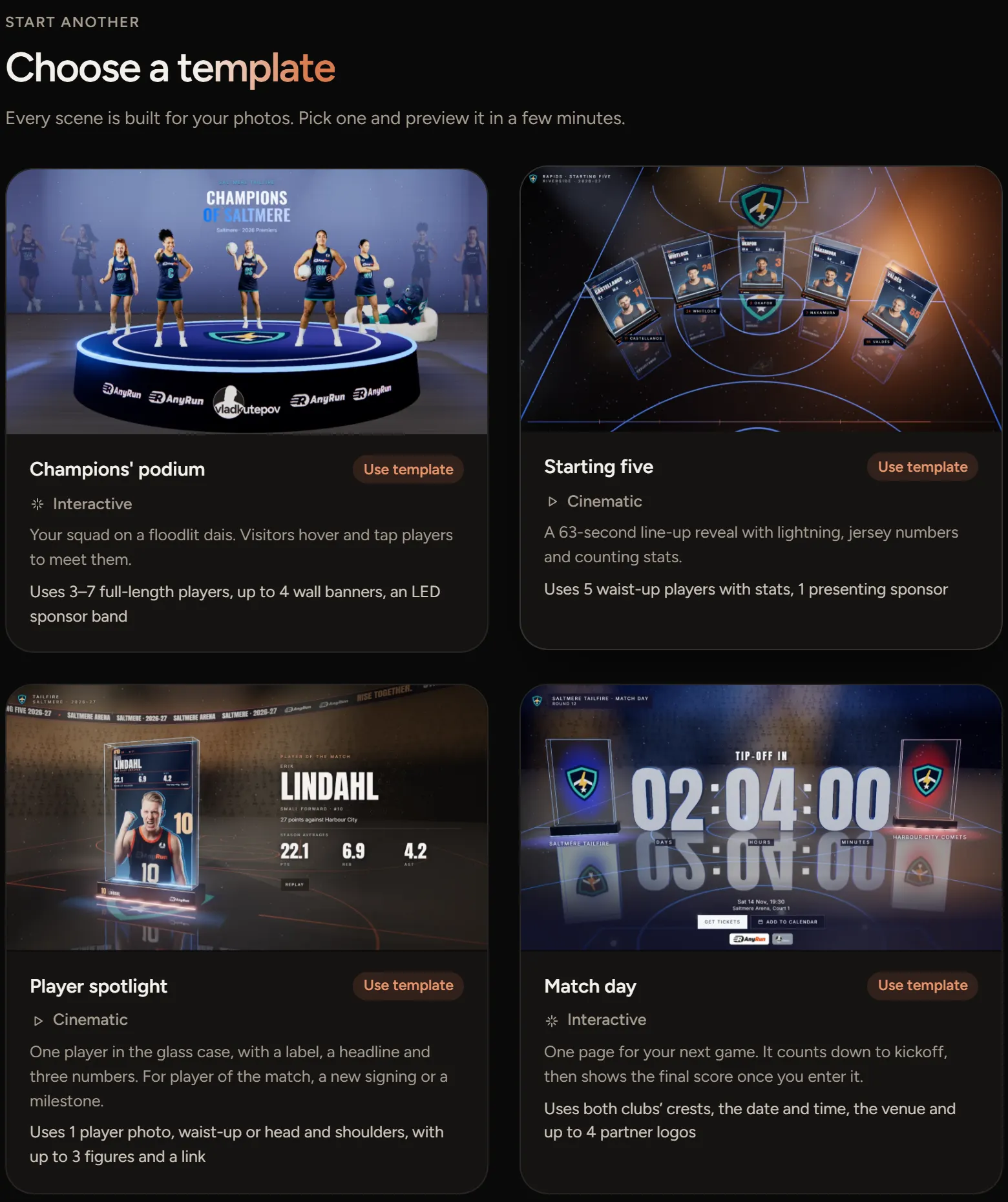
- Champions' podium puts 3 to 7 players on a floodlit stage. Visitors turn it and tap a player to meet them. Use full-length photos.
- Starting five is a 63-second line-up reveal with jersey numbers and stats that count up. It takes 5 waist-up photos and one presenting sponsor.
- Player spotlight puts one player in a glass case, with a headline and up to three numbers. Use it for player of the match, a new signing or a milestone.
- Match day counts down to your next game, then shows the final score once you enter it.
- Season puts the next game, every fixture, every result and the ladder on one page.
- Partner of the round thanks one sponsor, with their logo, an offer for your members and a link to their site.
Pick one
- On the home screen, scroll to Choose a template.
- Choose A team to see the club scenes, or All scenes.
- Choose Use template. The editor opens with sample players so you can see how it looks.
Change your mind
Each showcase keeps the scene you picked. To try another, start a new showcase from Choose a template. Your squad comes with you, so you don't upload photos twice.